Wireless Light Switch Installation Guide: No Wiring, No Batteries, No Problem
5 min read
Wireless Light Switch Installation Guide: No Wiring, No Batteries, No Problem
Installation Guide | Published by ILLUMRA | Updated February 2026 | 8 min read
When contractors and facility managers describe their retrofit challenges, the story is always the same: traditional rewiring is expensive, disruptive, and slow. Battery-powered alternatives sound appealing until you're managing replacement schedules across dozens — or hundreds — of switches.
ILLUMRA's wireless, self-powered lighting controls were designed specifically for commercial retrofits where traditional wiring isn't practical. This guide explains how they work, how to install them, and where they deliver the most value.
How Energy-Harvesting Wireless Switches Work
ILLUMRA switches use kinetic energy harvesting technology. Press the switch, and that mechanical action generates just enough power to transmit a wireless signal to the receiver controlling your lights. No wires run to the switch. No batteries to maintain. Just reliable, self-powered operation built on EnOcean technology with a 20+ year proven track record.
The system has two components:
The wireless switch generates power from each press and transmits a 902 MHz signal up to 100 feet indoors. It mounts anywhere using adhesive backing or screws — no electrical box required. Rated for hundreds of thousands of operations.
The receiver module installs at the fixture or junction box and controls the lighting load. This is the only component that requires an electrical connection, and it wires directly into your existing wiring. No new wire runs required.
Installation: 10–15 Minutes Per Location
Step 1: Install the Receiver
With power off, mount the receiver at the fixture or junction box and wire it between line voltage and the load. The process is comparable to installing a standard occupancy sensor.
Step 2: Pair the Switch
Press the learn button on the receiver, then press the top button on the switch three times. Pairing takes approximately 30 seconds. You can configure multiple switches to control one receiver, or one switch to control multiple receivers — depending on your project layout.
Step 3: Mount the Switch
Attach the switch using adhesive backing or screws on any surface — drywall, glass, concrete, metal, tile, or furniture. No electrical box, no wall cutting, no patching. Position the switch where it makes operational sense, not just where existing wiring happens to be.
Where Wireless Switches Make the Most Sense
Historic Buildings — Add modern lighting controls without damaging protected walls, plaster, or architectural finishes.
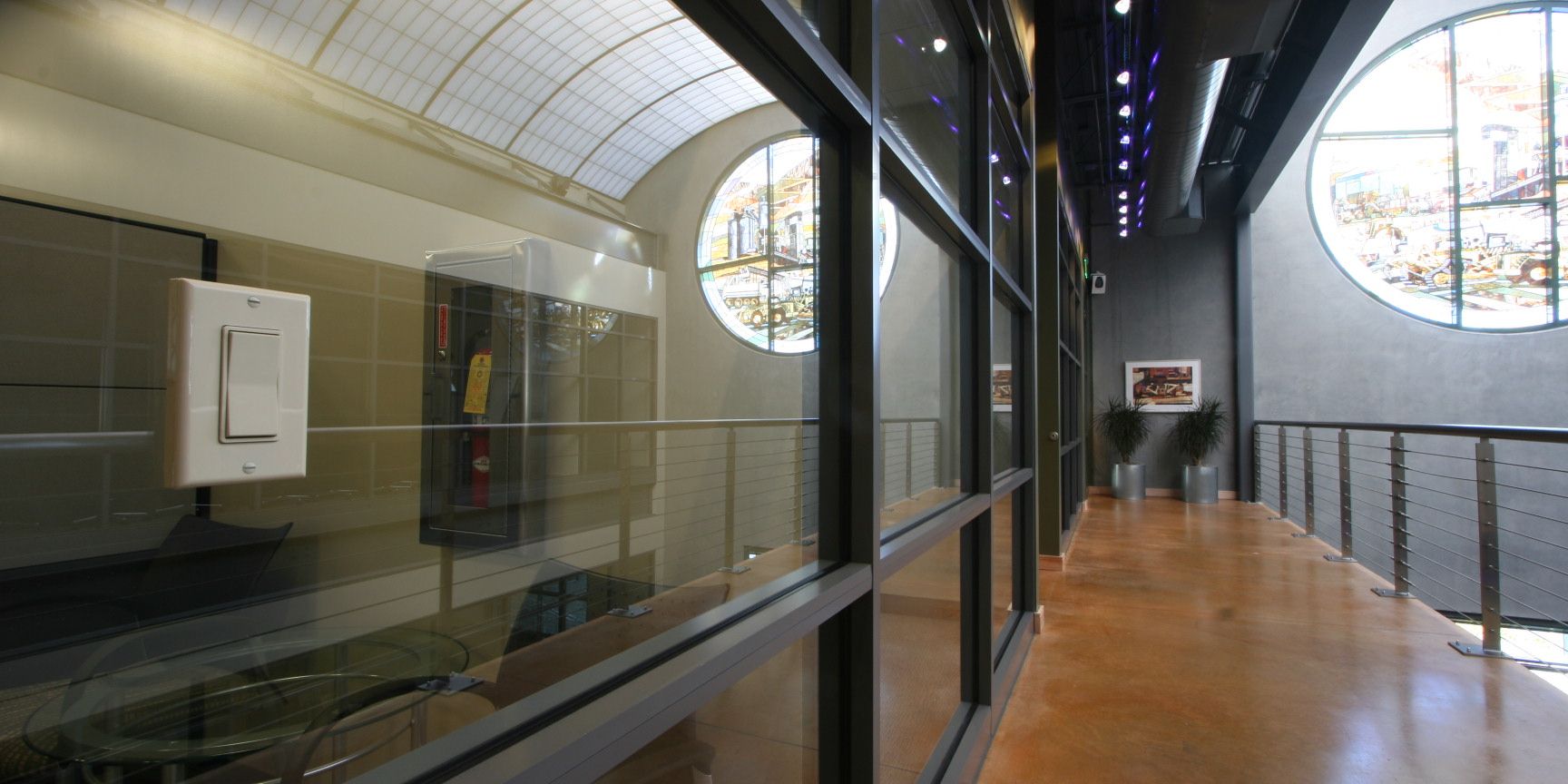
Office Retrofits — Relocate poorly positioned switches or add controls to glass-walled conference rooms without electrical work.
Educational Facilities — Install controls during occupied periods without classroom shutdowns or construction disruptions.
Hospitality Properties — Minimize room downtime during renovation and eliminate battery maintenance across entire properties.
Fast-Track Construction — Meet aggressive project schedules when traditional electrical timelines aren't feasible.
Senior Living Facilities — Place switches at accessible heights and custom locations without rewiring entire rooms.
Performance, Compatibility, and Code Compliance
Range and Reliability: The 902 MHz EnOcean protocol provides up to 150-foot indoor range and does not interfere with WiFi or Bluetooth networks. All components are commercial-grade and rated for high-traffic environments.
LED Compatibility: ILLUMRA receivers integrate with LED drivers and a variety of load types, making them well-suited for projects already transitioning to LED lighting.
Energy Code Compliance: ILLUMRA wireless switches support ASHRAE 90.1, IECC, and California Title 24 energy code requirements. The EnOcean protocol also enables integration with building automation systems for centralized control and reporting.
Building Codes: Wireless switches are classified as control devices, not line-voltage switches. All electrical work is contained to the receiver location. Always verify requirements with your local authority having jurisdiction (AHJ).
The Real Cost of Wireless vs. Traditional Wiring
Wireless switches carry a higher unit cost than traditional toggles. But retrofit project costs have to account for the full picture.
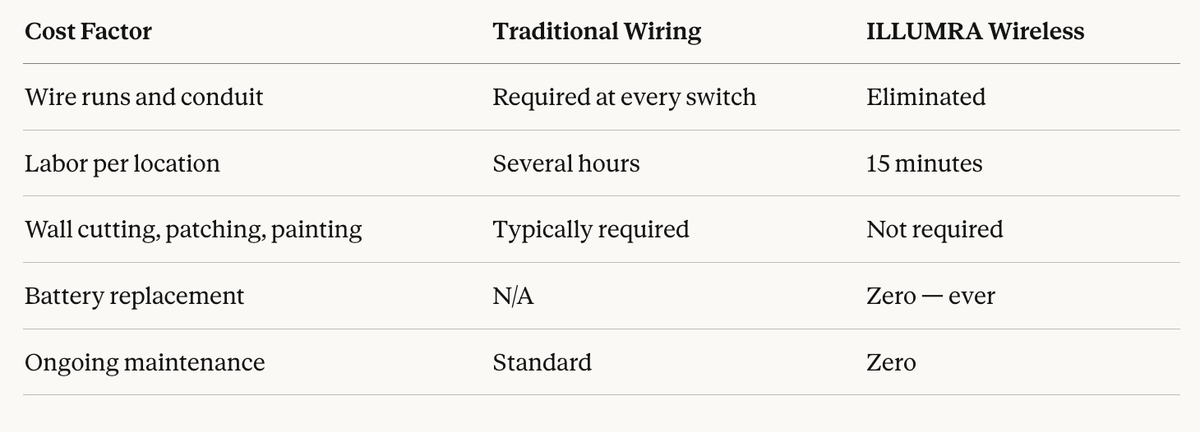
For retrofits that would otherwise require extensive new wiring, total installed cost typically favors wireless. Facility managers in particular cite zero ongoing maintenance as a deciding factor.
Frequently Asked Questions
Do wireless light switches require any wiring? No wiring is required at the switch itself. The only electrical connection is at the receiver, which wires into existing line voltage at the fixture or junction box — similar to installing an occupancy sensor.
How do battery-free switches generate power? ILLUMRA switches use kinetic energy harvesting. Each press generates a small burst of electricity from the mechanical action of pressing the switch. That energy powers a wireless signal to the receiver. No batteries are needed — ever.
How far can the wireless signal reach? ILLUMRA switches transmit up to 150 feet indoors using the 902 MHz EnOcean protocol. This frequency does not interfere with WiFi or Bluetooth networks.
How long does installation take? Approximately 10–15 minutes per location. The receiver wires into existing wiring at the fixture, and the switch mounts with adhesive or screws. No electrical box is required.
Are these switches compliant with energy codes? Yes. ILLUMRA wireless switches support ASHRAE 90.1, IECC, and California Title 24 requirements. Because they are control devices rather than line-voltage switches, all electrical work is isolated to the receiver.
What surfaces can the switch mount on? ILLUMRA switches mount on drywall, glass, concrete, metal, tile, and furniture using adhesive backing or screws. No electrical box or wall modification is required.
How long do the switches last? Each switch is rated for hundreds of thousands of operations with zero battery replacement or scheduled maintenance.
Can one receiver be controlled by multiple switches? Yes. Multiple switches can be paired to a single receiver, and a single switch can be configured to control multiple receivers, depending on your layout needs.
Why ILLUMRA
ILLUMRA has specialized in battery-free wireless lighting controls for commercial and institutional environments for over 18 years. Our switches are built on 25+ years of proven EnOcean energy-harvesting technology, manufactured in the USA, and backed by responsive technical support. The EnOcean protocol enables seamless integration with building automation systems — making ILLUMRA controls a practical fit for projects with centralized control requirements.
Ready to Simplify Your Next Retrofit?
ILLUMRA's self-powered wireless switches deliver fast installation, zero ongoing maintenance, and reliable long-term performance for commercial lighting retrofit projects.
Explore our product line or contact our team for project consultation and specification support.